Archive for June, 2015

DIY peristaltic pump

Shannon Faley, Bradly Baer, Matthew Richardson, Taylor Larsen, and Leon M. Bellan*

Vanderbilt University, Department of Mechanical Engineering, Nashville TN, 37235, USA

*leon.bellan@vanderbilt.edu

Why is this useful?

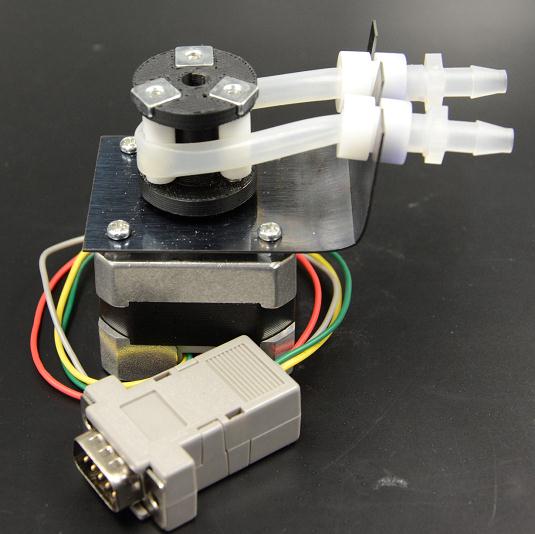
Figure 1: Fully assembled peristaltic pump


The majority of microfluidic applications require an external pumping mechanism.  Multi-channel, individually addressable pumps are expensive, often large, and prone to failure when operated inside cell culture incubators at 95% humidity.  The number of experiments that can be run at a given time is limited by the availability and expense of pumps.  Perfusing artificial tissue scaffolds containing engineered vasculature requires long-term (days to weeks) continuous flow at low rates.  We designed an inexpensive (~$100 for 2 pumps, ~$70 for each additional set of 2 pumps) peristaltic pumping system using an Arduino- controlled stepper motor fitted with a custom 3D-printed pump head and laser-cut mounting bracket. Each pump has a footprint roughly that of the NEMA 17 stepper motor and is easily controlled individually using open source software.  Up to 64 motor shields can be stacked for a given Arduino Uno R3, each capable of supporting two stepper motors, and thus has the expansion potential to control 128 pumps in parallel.  We have successfully implemented two stacked motor shields driving four independent stepper motors. Flow rate is dependent upon both tubing diameter and step rate.  We found flow rates to range between ~50-250 μl/min for 1/16” tubing and ~500-1500 μl/min for 1/4″ tubing.  We anticipate that this pump design will likely prove more resilient to incubator humidity compared to standard peristaltic pump powered by DC motors.  Since implementation, these pumps have functioned without fail for 3 months (intermittent) under humid conditions. In the event of failure, however, cost of motor replacement is an economical $14.
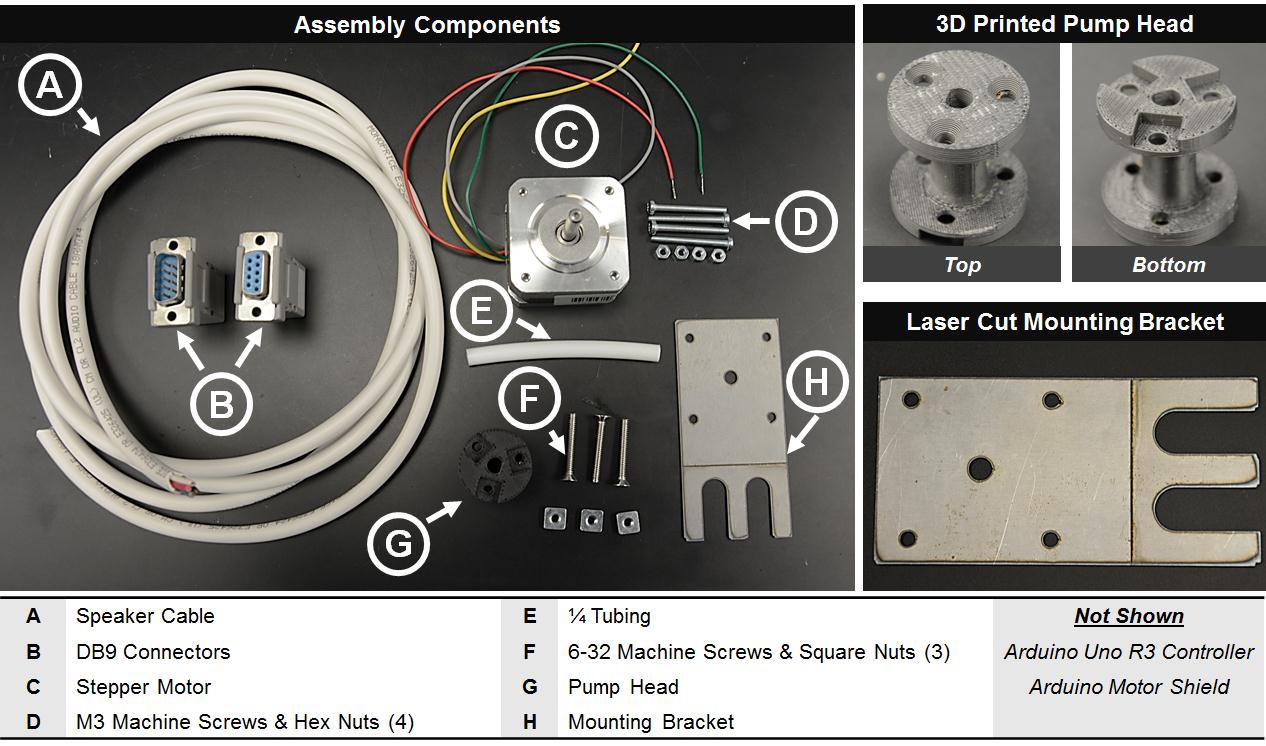
Figure 2

What do I need?


Materials:

  • Nema 17 stepper motor ($14, spec, vendor)
  • Arduino Uno R3 Controller ($25, spec, vendor)
  • Arduino Motor Shield ($20, spec, vendor)
  • M3 machine screws (4) & hex bolts (4) ($1, McMaster-Carr)
  • DB9 Male & Female Solder Connectors ($9, StarTech)
  • 18AWG 4C speaker cable ($10, Monoprice)
  • Spring steel
  • ABS Filament
  • 6-32 machine screws & square nuts (3) ($1, McMaster-Carr)

Equipment:

  • 3D printer
  • Laser/Metal cutter
  • Soldering iron & solder
  • Butane torch

What do I do?


Pump head fabrication:

  1. Using ABS filament, 3D print pump head from file pumphead.crt.9
  2. Cut three 15 mm (length) sections from rigid ¼” tubing to serve as rollers.
  3. Use the three 6-32 machine screws and square nuts to assemble the tubing to pump head as shown in Figure 3.
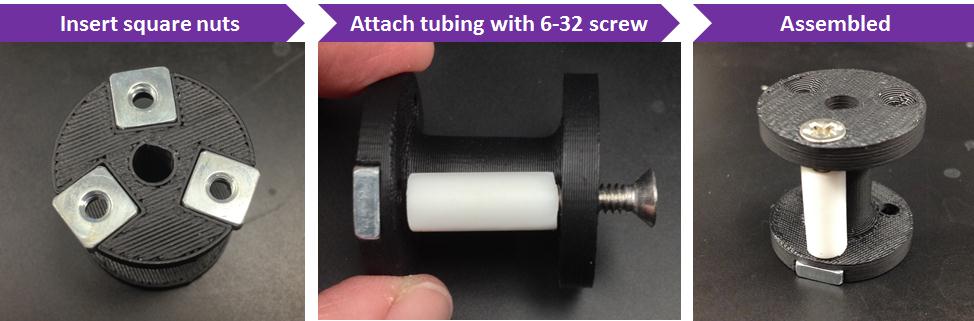
Figure 3

Mounting bracket fabrication:

  1. Using bracket template file (2000 Pump Mount v4) and laser cutting facilities, produce a mounting bracket from spring steel, or other appropriate metal.  Note that the score line bisecting the bracket is intended to be cut at a lower power.  This line is just a marker to show where to bend the bracket in the following step.
  2. Using handheld butane torch, heat mounting bracket along score line and bend with pliers.  Repeat until mounting bracket forms a right angle (see Figure 1).

Motor Electrical Wiring: (see figure 4 for example orientation)

  1. Solder motor wires to DB9 Male Connector
  2. Solder one end of speaker wire to DB9 Female Connector
  3. Connect opposite end of speaker wire to Arduino Motor shield

Figure 4 Example of connection scheme by wire color

Pump Assembly:

  1. Use M3 machine screws to attach mounting bracket to stepper motor, with corresponding hex nuts as spacers between motor and bracket.
  2. Press fit pump head onto rotor shaft.
  3. Connect motor to Arduino using DB9 connectors

Arduino/Motor Shield Assembly:

  1. Follow assembly instructions provided by adafruit.com  (https://learn.adafruit.com/adafruit-motor-shield-v2-for-arduino/stacking-shields).  See also Figure 5.
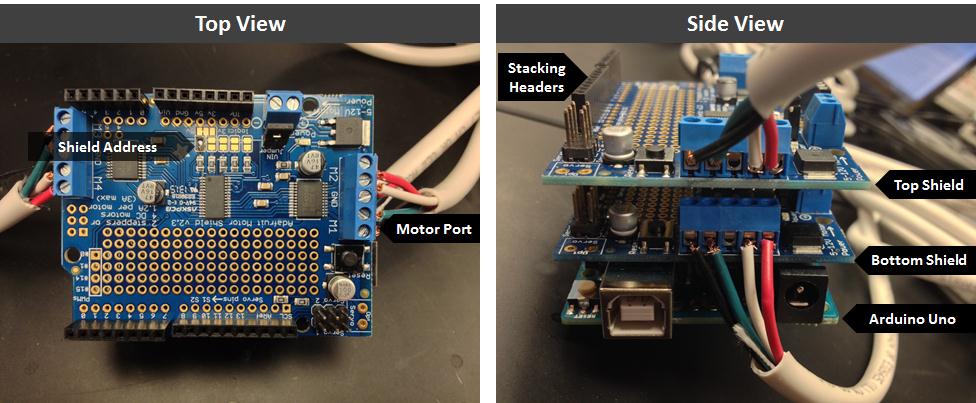
Figure 5

Computer Control:

1. See online resources for easy starter code (https://learn.adafruit.com/adafruit-motor-shield-v2-for-arduino/install-software)

2. Load example code to control 2 stacked motor shields running four independent pumps simultaneously. (foursteppers_v2.ino)

3. Start pumping!  See  video clip for multi-pump demonstration:


Please click here to download the DIY Peristaltic Pump Files

Digg This
Reddit This
Stumble Now!
Share on Facebook
Bookmark this on Delicious
Share on LinkedIn
Bookmark this on Technorati
Post on Twitter
Google Buzz (aka. Google Reader)

Low Temperature Melting Metal Solders For Electrical Interconnects On Plastics

Abdul Wasay, Dan Sameoto
Department of Mechanical Engineering, University of Alberta, Edmonton, T6G 2R3, CANADA.
Email: sameoto@ualberta.ca

Why is it useful?

Electrodes have been used for driving electrochemical reaction on various Lab on chip applications, running electroosmotic pumping or simple sensing of current or voltages. With the recent thrust to move to thermoplastics, simple electrodes have been patterned at low temperatures using vacuum plasma sputtering via intermediate masks1 or ink electrodes2. While, wire-bonding or soldering have been the standard protocols for providing interconnections to the bond pads on silicon or glass chips, the temperatures in these cases are often beyond the glass transition or even melting temperatures of most thermoplastic substrates, which leads to defects and ineffective connection. Other techniques such as conductive epoxies can be problematic due to longer cure times, permanent fixtures and potentially low uniformity of conductive properties which are affected by sintering times and temperatures.

We present a simple soldering technique using low temperature melting metals that is compatible with nearly any thermoplastic substrate and thin-film electrodes.

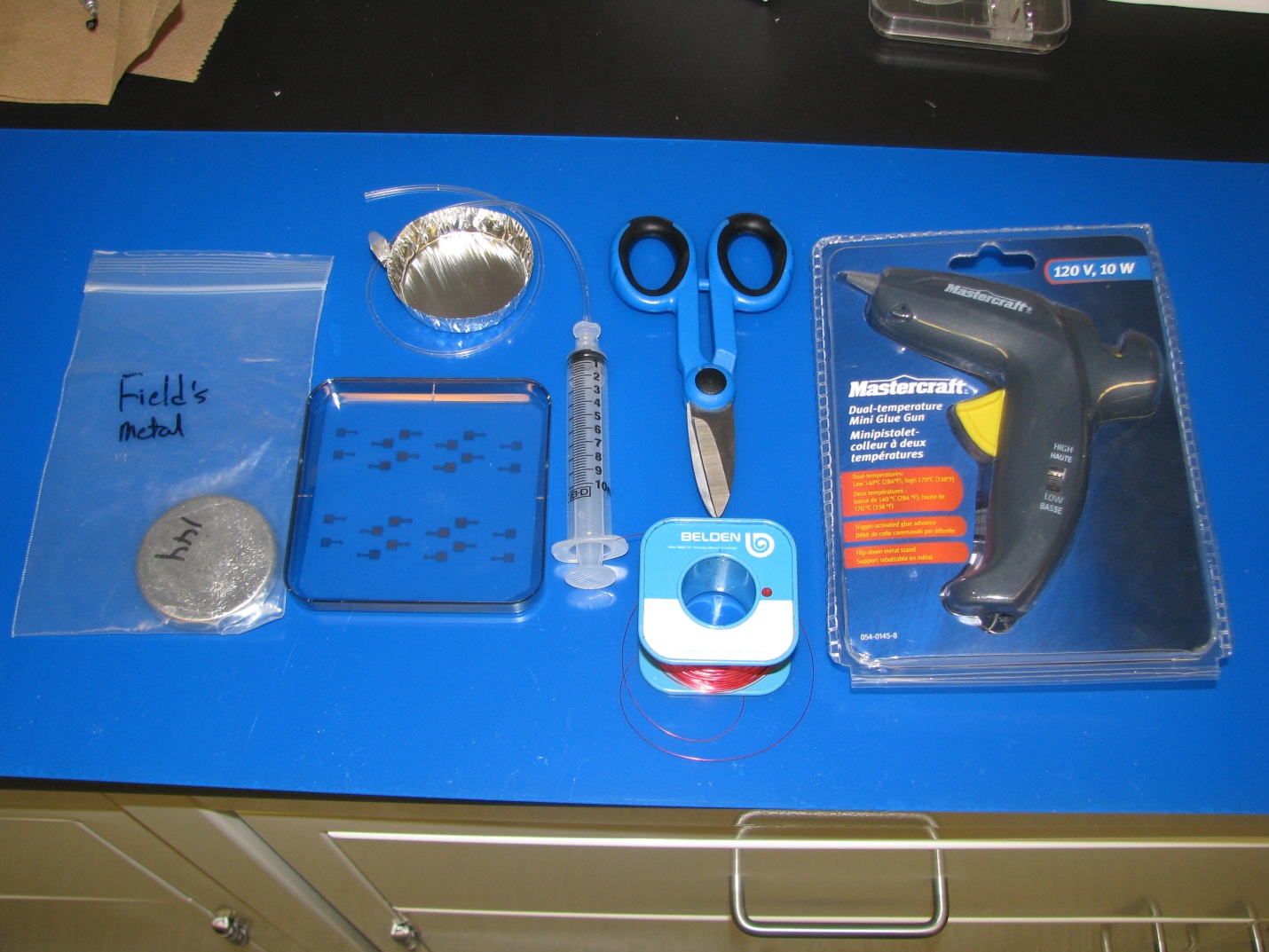
Fig.1. Basic Apparatus

  • Field’s metal (eutectic alloy of 32.5% Bi, 51% In, 16.5% Sn) preferred for low toxicity, although lead based alternatives exist.
  • Syringe connected to tygon tube
  • Copper wire
  • Aluminum foil dish
  • Electrodes patterned on thermoplastic substrate (here, polystyrene with  ~ 20 nm thick Au electrodes)

Tools

  • Hot Plate
  • Shearing scissor
  • Hot glue gun (in this case a Mastercraft dual temperature glue gun, operated at low temperature setting)

What do I do?

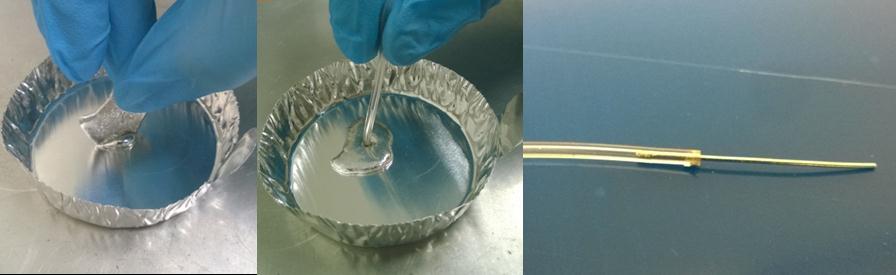
To extrude the Fields metal into a thin filament, (Fig.2)

  • melt the Fields metal (ROTO1443;  Tm=62.2oC, typical resistivity ~520nΩ-m) in an aluminum foil dish.  The metal is very soft, so bolt cutters can easily remove smaller portions for melting if desired.
  • use a suitable diameter and length  tygon tube and pull the molten metal into it using a syringe – it will freeze within a few inches (1/32” inner diameter tube shown here).
  • allow it to cool to room temperature (less than a minute) and then pull out the filament.

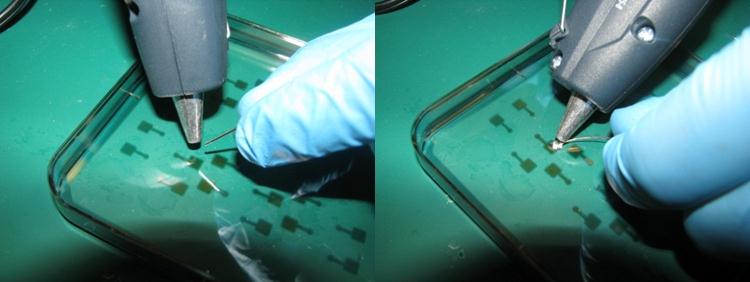
Soldering Process,(Fig.3.)

  • Hold the Field’s metal filament with a hot glue gun used for lower melting point glues (measured tip temperature   ̴120 C) over the electrode patterned petri dish and melt it over the electrodes.
  • Solder the copper wire with the Field’s metal.  After soldering, excess metal can be removed from the hot glue gun tip with paper towel.

The resultant solder is strong enough to be used for mainstream lab on chip applications. They can be removed by a strong tug, under which case the thin electrodes on plastics could be stripped.

Fig.2. Fields metal extrusion process

Fig.3. Soldering process

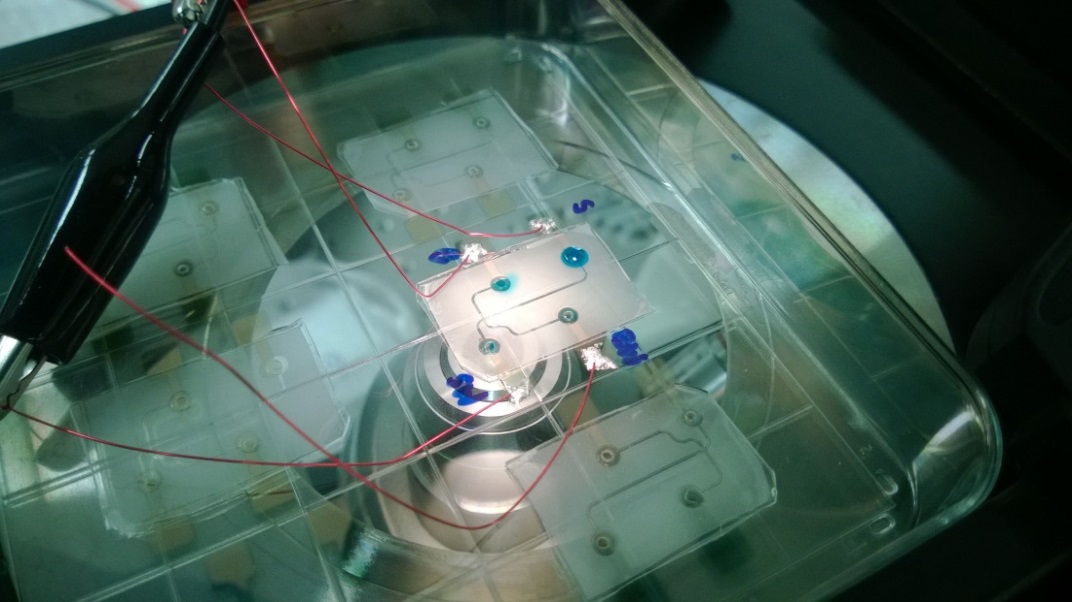
Fig.4. Gecko adhesives based reversibly bonded4 capillary electrophoresis device with integrated electrodes

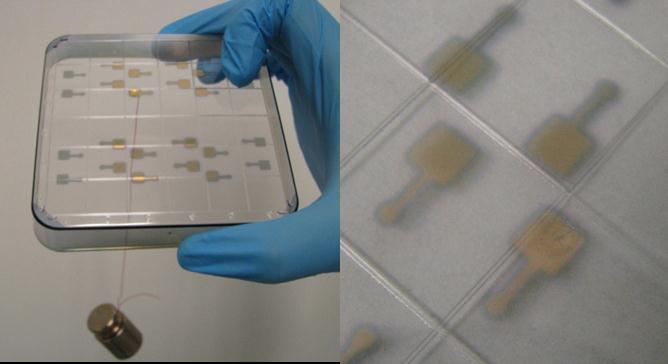
Fig.5. a) Demonstration of solder strength b) small electrode stripping as observed when the solder is removed by a strong tug

What else should I know?

While there are quite a few options of low melting temperature metals to choose from, most of them contain heavy metal like lead or cadmium, which may ideally be avoided. While Field’s metal is relatively expensive due to the indium content, the solders can be recovered for reuse in the lab and in general is a better option for electrically connecting thin-film electrodes to temperature sensitive substrates in a quick, reliable fashion.

Watch the video here: Low Temperature Melting Metal Solders For Electrical Interconnects On Plastics

References:

1 A. Toossi, M.Sc, University of Alberta, 2012.
2 C. E. Walker, Z. Xia, Z. S. Foster, B. J. Lutz and Z. H. Fan, ELECTROANALYSIS, 2008, 20, 663-670.
3 http://www.rotometals.com/product-p/lowmeltingpoint144.htm
4 A. Wasay and D. Sameoto, Lab Chip, 2015, (DOI:10.1039/C5LC00342C).

Digg This
Reddit This
Stumble Now!
Share on Facebook
Bookmark this on Delicious
Share on LinkedIn
Bookmark this on Technorati
Post on Twitter
Google Buzz (aka. Google Reader)

Micromilling Techniques II: Tool Alignment

David J. Guckenberger1, Theodorus E. de Groot1, Alwin M.D. Wan2, David J. Beebe1 and Edmond W. K. Young2,*

1 Department of Biomedical Engineering, Wisconsin Institutes for Medical Research, University of Wisconsin-Madison, Madison, WI, USA

2 Department of Mechanical and Industrial Engineering, University of Toronto, 5 King’s College Road, MC313, Toronto, ON, Canada.

* Corresponding Author, E-mail: eyoung@mie.toronto.ca; Tel: +1(416) 978 1521

Why is this useful?


­­­­­­­­­­Micromilling is a highly efficient method for fabricating microfluidic devices directly in polymeric materials like thermoplastics. Please see the review article by Guckenberger and co-workers for a primer on micromilling.1 After securing your workpiece to the milling table,2 the next step in the milling process is to align the tool to the workpiece, thereby defining the coordinate origin. Many high-end mills designed for micromilling have automated tool alignment systems. However, lower cost mills that are also capable of milling microdevices may not have tool alignment systems, and the user must therefore manually align the tool to the workpiece to the desired accuracy. Here we present several alignment techniques that are low cost and can be performed by minimally trained users. We divide tool alignment into two separate directions: the vertical z-axis direction, and the planar x-y plane direction.

What do I need?


  • CNC Mill (PCNC 770, Tormach)
  • Tool, e.g. endmill of choice
  • Workpiece (properly secured to milling table, see ref. [2])

Specific tooling or materials required for each technique are referenced separately below, under the “Tooling Note”.

What do I do?


Z-axis Direction

Fig. 1. Four techniques for aligning the tool to the workpiece in the z-axis (from left to right): (i) reflection, (ii) chip, (iii) paper, and (iv) collet technique.


(i) Reflection Technique

Tooling Note: This technique requires a reflective surface (e.g., transparent materials such as PS or PMMA), but otherwise does not require any specific tooling.


Step 1: Start with the tip of the tool slightly above the workpiece, with the spindle turned off.
Step 2: Looking from a near planar location with respect to the workpiece, lower the tool until the tool itself comes in contact with its reflection.
Step 3: Set this location as z = 0.

Tip:         Placing a piece of paper behind the tool will improve contrast, making it easier to identify when the tool contacts the reflection. A magnifying glass can be used to improve visibility.


(ii) Chip Technique

Tooling Note: This technique does not require any specific tooling.


Step 1: Start with the tool slightly above the surface with the spindle running (i.e., the tool should be rotating).
Step 2: Lower the tool towards the surface until either (a) a chip is observed, (b) a mark is made on the surface, or (c) a sound is made from the tool cutting the material.
Step 3: Set this location as z = 0.

Tip:      This method works best for large and flat endmills, and can be more difficult with small endmills or any tool that is pointed or round at the tip. Note that this is a physical contact method, and will blemish the surface.


(iii) Paper Technique

Tooling Note: This technique requires a small piece of paper of known thickness.


Step 1: Start with the tool above the surface with the spindle turned off.
Step 2: Place a piece of paper (with known thickness) between the tool and the workpiece.
Step 3: While moving the piece of paper back and forth, lower the tool in stepwise increments.
Step 4: Continue lowering the tool until it causes resistance to the sliding piece of paper.
Step 5: Set this location as z = the thickness of the paper (e.g., .003”)

Tip:      Practice more to become comfortable with identifying when the endmill comes in contact with the surface.

(iv) Collet Technique

Tooling Note: This technique requires an ER20 tool holder (#31829, Tormach) from the Tormach Tooling System (TTS) and an ER20 1/8” collet (#30112, Tormach).


Step 1: Place tool in collet and secure using the setscrew on the side.
Step 2: Without the spindle running, lower the tool until it is just above the surface.
Step 3: Loosen the setscrew and allow the tool to fall into contact with the workpiece.
Step 4: Tighten the setscrew.
Step 5: Set this location as z = 0.


X-Y Plane Direction

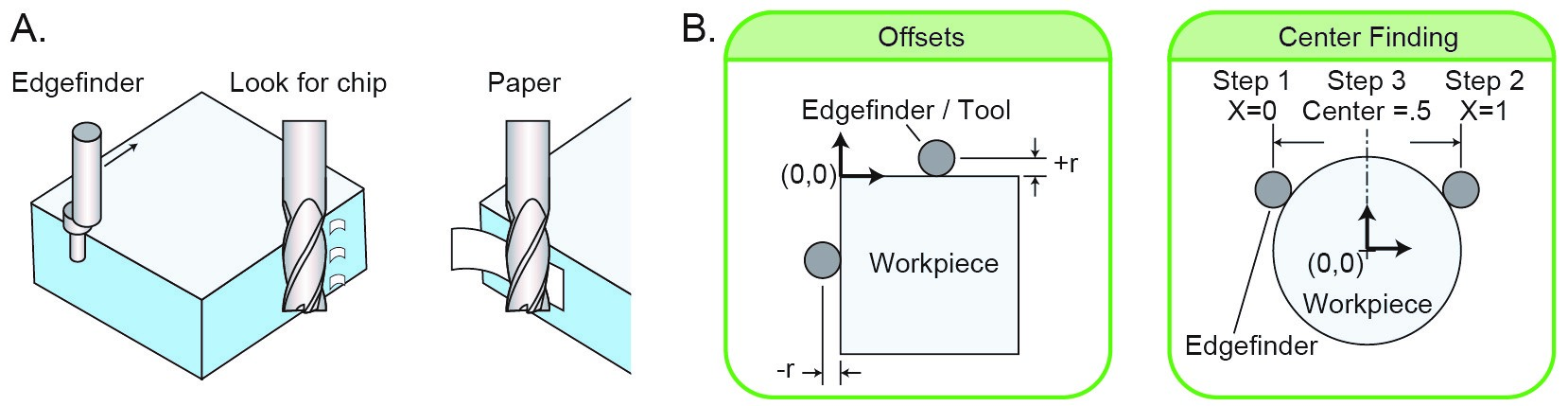
Fig 2. Techniques for aligning the tool in the xy plane. (A) Illustrations of the (i) edgefinder, (ii) chip, and (iii) paper techniques. (B) Guide to offsetting a tool (left) and finding the center of an object (right).


(i) Edgefinder Technique

Tooling Note:
This technique requires an edgefinder (e.g., #02035186, MSC Industrial Supply).


Step 1: Place edgefinder in collet and start spindle (1000 rpm works well with the edgefinder).
Step 2: Deflect the tip of the edgefinder so that it lies eccentric to its initial axis.
Step 3: Starting with the x-axis, move the edgefinder toward a perpendicular surface. The tip of the edgefinder will become concentric upon contact with surface, and then return to an eccentric position immediately afterward. This sudden “jump” in eccentricity marks the edge.
Step 4: Set the current location to either plus or minus the radius of the tip. See Fig. 2B for more details on deciding a positive or negative bias.

Chip Technique

Tooling Note: This technique does not require any specific tooling.


Step 1: Start with the tool near the face of interest with the spindle running (i.e., the tool should be rotating).
Step 2: Step the tool towards the surface, until (a) a chip is observed, (b) a mark is made on the surface, or (c) a sound is made from the tool cutting the material.
Step 3: Set this location as (plus or minus) the radius of the endmill.

Tip:      This method works best for large diameter endmills. Note that this is a physical contact method, and will blemish the surface.

Paper Technique

Tooling Note: This technique requires a small piece of paper of known thickness.


Step 1: Start with the tool near the face of interest with the spindle running
Step 2: Gripping gently with thumb and fore-finger, or by pressing it against the surface place a piece of paper between the tool and the surface.
Step 3: Step the tool towards the surface until the tool pulls the paper.
Step 4: Set this location as (plus or minus) the sum of the endmill radius and paper thickness.

Tip:                  This method works best for large endmills.
Caution:          Be sure to keep fingers clear of the cutting tool.

References


1.   Guckenberger DJ, de Groot T, Wan AMD, Beebe DJ, Young EWK, “Micromilling: A method for ultra-rapid prototyping of plastic microfluidic devices”, Lab on a Chip, DOI:10.1039/c5lc00234f (2015).

2.   Guckenberger DJ, de Groot T, Wan AMD, Beebe DJ, Young EWK, “Micromilling Techniques I: Securing Thin Plastic Workpieces for Precise Milling”, Chips & Tips (2015).

Digg This
Reddit This
Stumble Now!
Share on Facebook
Bookmark this on Delicious
Share on LinkedIn
Bookmark this on Technorati
Post on Twitter
Google Buzz (aka. Google Reader)

Micromilling Techniques I: Securing Thin Plastic Workpieces for Precise Milling

David J. Guckenberger1, Theodorus E. de Groot1, Alwin M.D. Wan2, David J. Beebe1 and Edmond W. K. Young2,*

1 Department of Biomedical Engineering, Wisconsin Institutes for Medical Research, University of Wisconsin-Madison, Madison, WI, USA

2 Department of Mechanical and Industrial Engineering, University of Toronto, 5 King’s College Road, MC313, Toronto, ON, Canada.

* Corresponding Author, E-mail: eyoung@mie.toronto.ca; Tel: +1(416) 978 1521

Why is this useful?


Micromilling is a highly efficient method for fabricating microfluidic devices directly in polymeric materials like thermoplastics. A recent review article highlights the use and relevance of micromilling in the field of microfluidics.1 While milling is most popular among machinists, the technique is becoming cheaper and more accessible to many others. Thus, there is a need for disseminating technical know-how for achieving quality micromilled parts. One common technical issue is ensuring flat work surfaces, and eliminating warping and bending of thin plastics during micromilling, which can lead to uneven milling and large errors in feature dimensions. Here we present a simple technique to achieve flat work surfacesleveled to within 40 μin / in (.04 μm / mm)) – and properly secure thin plastic workpieces to minimize warping. Please refer to the review article by Guckenberger and co-workers for a primer on micromilling

What do I need?


Tools:

  • CNC mill                                 (PCNC 770, Tormach)
  • 3/8” set screw holder       (#31820, Tormach)
  • Granite block                        (6” x 12” x 2” Grade AA, Standridge)
  • T-slot clamps                        (#32580, Tormach)
  • Drop test indicator             (#24-315-4, SPI)
  • Wrench                                    (choose appropriate size for clamps)

Materials:

  • Plastic workpiece                        (e.g., polystyrene, cyclo-olefin copolymer (COC), PMMA)
  • Surface protection tape            (#6092A24, McMaster-Carr)
  • Two-sided or transfer tape      (#9472LE, 3M)
  • Silicone rubber, 1/16” thick    (#8632K41 – Durometer Hardness: 40A, McMaster-Carr)

Fig. 1 Tooling and Materials. (A) Hardware necessary for setting up the granite block. Assembly of the T-slot clamps is shown in Fig. 2. (B) (Top) Components needed for the drop test indicator: (i) collet/tool holder, (ii) aluminum adapter, (iii) drop test indicator, (iv) screw to attach indicator to the adapter. (Bottom) Side view of the assembled components. (C) Materials needed for adhering workpiece to the block: (i) surface protection tape, (ii) silicone rubber, (iii) transfer tape, (iv) polystyrene sheet.

What do I do?


Preparation: The dial indicator must be affixed to the head of the mill. To do so, mounting brackets can be purchased or custom-made, as we have done using a block of aluminum. This aluminum serves as a simple adapter between the dial indicator and the collet.

Step 1: Place granite block on the milling table. Note that a stiff yet compliant material is necessary between the block and the milling table to allow for minor adjustments. The particle-board feet affixed to the granite block by the manufacturer (Standridge) are sufficient.

Step 2: Assemble the clamps (Fig. 2A), and position the clamps in either a 3-clamp (Fig. 2B) or 4-clamp (Fig. 2C) configuration. The front of the clamp (i.e., the portion that contacts the granite block) should be the same height as or lower than the rear of the clamp.

Step 3: Hand-tighten each clamp, then tighten an addition 1/8th turn using a wrench.

Step 4: Level the granite block by using the drop test indicator to measure the height across the entire block. The following steps are recommended:

a)      Lower the indicator onto the center of the block.
b)      Move the indicator along x-axis to the two ends of the block, and note the height of both ends.
c)      Position the indicator on the high side of the block and tighten the clamps until the height matches the low side.
d)     Repeat steps (b) and (c) for the y-axis.
e)      Repeat steps (b) to (d) until the block is level to desired tolerance.
f)       Tip: When using the 4-clamp configuration, clamps should be equally tightened in pairs to maintain levelness in the other direction.

Fig. 2 (A) T-slot clamp setup configuration. (B) Granite block configuration using three clamps. (C) Granite block configuration using four clamps.

Step 5: (Optional) Apply a protective adhesive film to the workpiece. This will simplify removal of the transfer tape from the workpiece (see Video).

a)      Peel a piece of protective adhesive film from the roll of film.
b)      Place a piece of silicone rubber on the roll of tape or other cylindrical roll.
c)      Place the protective adhesive film on top of the silicone rubber with the adhesive side face up, assuring the tape is flat.
d)     Roll the workpiece onto the piece of tape. The silicone rubber will provide compliance below the tape to prevent bubbles in the tape.
e)      Press the tape down to make sure it is fully adhered to the workpiece.

Step 6: Apply 2-sided tape or transfer tape to the workpiece

Step 7: Stick the workpiece onto the granite block.

Step 8: (Optional) Use the drop test indicator again to ensure the workpiece is flat.

References


1.   Guckenberger DJ, de Groot T, Wan AMD, Beebe DJ, Young EWK, “Micromilling: A method for ultra-rapid prototyping of plastic microfluidic devices”, Lab on a Chip, DOI:10.1039/c5lc00234f (2015).

Digg This
Reddit This
Stumble Now!
Share on Facebook
Bookmark this on Delicious
Share on LinkedIn
Bookmark this on Technorati
Post on Twitter
Google Buzz (aka. Google Reader)